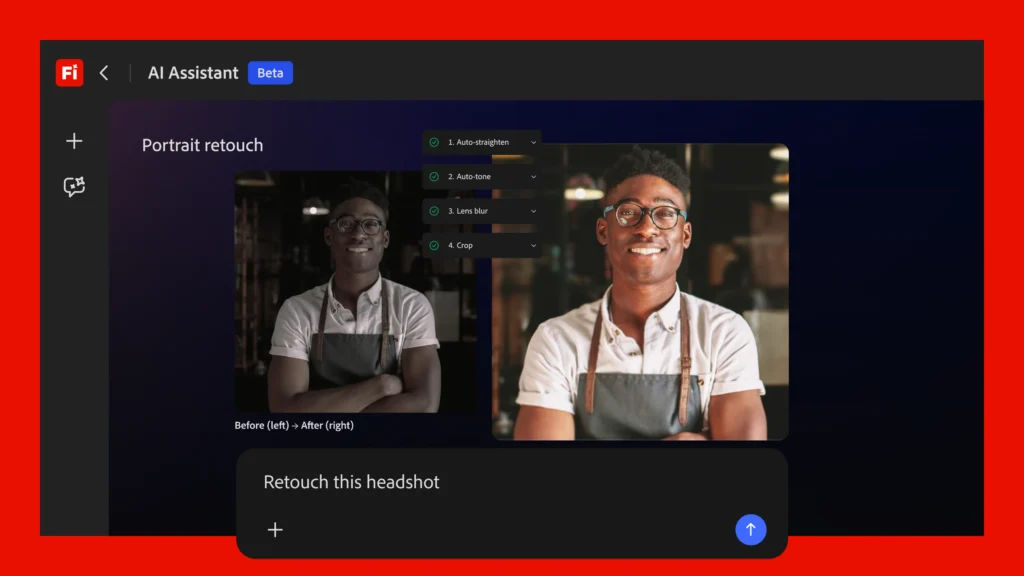

For decades, mastering creative software meant navigating complex menus, memorizing keyboard shortcuts, and understanding technical jargon. What if you could simply tell your software what you want? Adobe is betting that this conversational approach is the future. The company is integrating a new Firefly AI Assistant across its Creative Cloud platform, enabling users to edit images, videos, and designs by typing descriptive prompts into a chat interface. This represents more than a new feature—it’s a fundamental rethinking of the creative process.
<img src="https://cdn.vox-cdn.com/thumbor/example-image.jpg" alt="Adobe Firefly AI Assistant Interface” loading=”lazy”>
What is Adobe’s Firefly AI Assistant?
The core idea is deceptively simple: instead of manually selecting tools in Photoshop, adjusting sliders in Premiere Pro, or manipulating vectors in Illustrator, you describe your desired outcome. Want to “make the sky more dramatic,” “remove the background from this product photo,” or “apply a cinematic color grade to this video clip”? You just type it. The AI interprets your natural language request and executes the appropriate series of edits across the relevant Adobe application.
This isn’t about fully automated, one-click creation. Adobe emphasizes that the assistant is designed to augment human creativity, not replace it. It handles the tedious, technical, or repetitive tasks—like object removal, color correction, or batch resizing—freeing the creator to focus on higher-level artistic direction and decision-making. You remain in the driver’s seat, issuing commands and refining results.
The “Fundamental Shift” in Creative Work
Adobe’s announcement frames this as a “fundamental shift in how creative work is done.” This shift has two major components:
- Lowering the Skill Barrier: Proficiency in professional creative tools has traditionally required significant training and practice. Conversational AI dramatically flattens this learning curve. A marketing manager can now make precise visual adjustments to a campaign asset without needing to be a Photoshop expert. A small business owner can edit their own product photos. This democratization opens up professional-grade editing to a vastly larger audience.
- Accelerating the Creative Workflow: For seasoned professionals, the value lies in speed. Concept iteration becomes lightning-fast. Trying out five different color palettes, cropping variations, or layout adjustments can be done in minutes through conversation, not hours of manual labor. This allows for more experimentation and faster project turnaround.
“The goal is to remove the friction between creative intent and execution,” an Adobe spokesperson noted. “When you can describe a vision and see it realized instantly, it changes the entire creative dynamic.”
Practical Use Cases and Industry Implications
How will this actually be used? The applications are broad:
Social Media Managers: Quickly reformat and optimize graphics for different platforms (“Crop this for an Instagram Reel and add animated text”).
Photographers: Perform complex edits like frequency separation or dodge-and-burn through simple instructions.
Video Editors: Apply consistent color grading across clips or generate B-roll based on a text description.
UI/UX Designers: Prototype different design system variations (“Try this button in all our brand colors and show me a side-by-side comparison”).
This move also solidifies Adobe’s position in the competitive generative AI landscape. While tools like Midjourney and DALL-E excel at generation from scratch, Adobe is focusing its AI on editing and enhancing existing assets within its established professional ecosystem. It’s a smart differentiation, leveraging its vast libraries of stock assets, fonts, and user-created content.
Availability, Concerns, and the Road Ahead
Adobe states the Firefly AI Assistant will be “available soon” on the Firefly web platform, with integration into desktop apps like Photoshop and Premiere Pro to follow. A specific launch date and pricing details (likely tied to Creative Cloud subscriptions) are still forthcoming.
As with any powerful AI tool, questions remain. How will Adobe ensure the AI accurately interprets subjective creative requests? What safeguards are in place for ethical use and copyright compliance, especially when the AI is manipulating existing imagery? Adobe will need to be transparent about the training data for these models and the guardrails built into the system.
The integration of conversational AI into creative suites is an inevitable and exciting trend. Adobe’s move validates a future where our tools understand our intent, not just our clicks. It promises to make professional creativity more accessible and efficient, fundamentally changing the relationship between the artist and the software. The era of talking to your design app has begun.
Comments (0)
Login Log in to comment.
Be the first to comment!