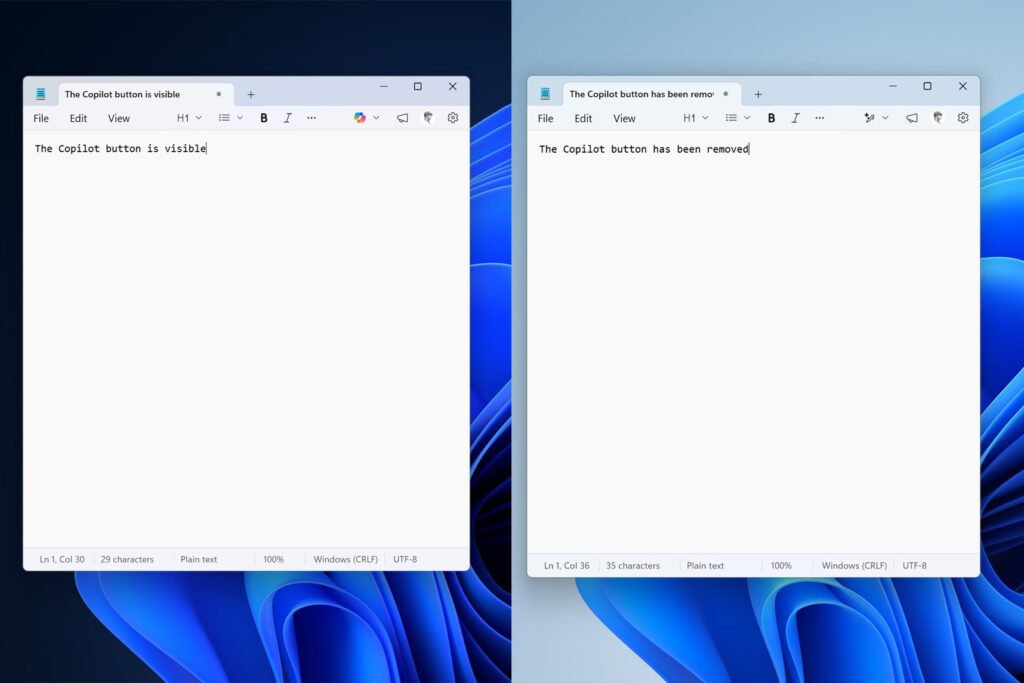

In a significant design shift, Microsoft has begun removing prominent Copilot buttons from several of its core Windows 11 applications. This move, first spotted in preview builds for Windows Insiders, signals a strategic pivot in how the company is integrating its generative AI assistant into the operating system’s fabric. Instead of a one-size-fits-all button, AI features are being woven more thoughtfully into the user experience.
The First Apps to Lose the Copilot Button
The change is most visible in two everyday utilities: Notepad and the Snipping Tool. In the latest Notepad preview, the dedicated Copilot button in the toolbar has vanished. In its place, users now find a new “Writing Tools” menu. This menu is expected to host AI-powered writing assistance features, suggesting a move from a generic chatbot prompt to specialized, context-aware help.
Similarly, in the Snipping Tool, the Copilot button that previously appeared after selecting a screen capture area is no longer present. This indicates Microsoft is rethinking when and where a direct Copilot invocation makes sense, favoring a less intrusive interface.
Part of a Broader “Fix Windows 11” Plan
This isn’t a random tweak. Microsoft has publicly stated this is part of a deliberate initiative to “reduce unnecessary Copilot entry points.” The company named Snipping Tool, Photos, Widgets, and Notepad as the starting apps for this cleanup. The goal is to declutter the interface and make AI assistance feel more organic and less like a marketing add-on.
This effort falls under Microsoft’s broader commitment to refining and “fixing” the Windows 11 user experience based on feedback. It represents a maturation from the initial wave of AI hype, where slapping a “Copilot” button was the priority, to a more nuanced phase focused on utility and seamless integration.
AI Features Are Here to Stay, Just Less In-Your-Face
It’s crucial to understand what this change doesn’t mean. Microsoft is not abandoning AI in Windows. Far from it. The underlying AI capabilities powered by Copilot are becoming more entrenched. The shift is in the presentation. The company is moving from blatant, standalone buttons to embedding AI intelligence directly into relevant menus and workflows.
For example, that new “Writing Tools” menu in Notepad is almost certainly where AI-powered grammar check, rewrite suggestions, or summarization will live. In Photos, AI editing features might be integrated into the existing adjustment panels rather than behind a separate Copilot door.
Analysis: The End of AI Button Fatigue?
This move by Microsoft is a telling indicator of industry trends. The initial gold rush to brand everything with “AI” led to interface clutter and, at times, confusing user journeys. A dedicated button often meant taking the user out of their current app and into a separate Copilot pane, breaking their workflow.
By removing these buttons, Microsoft is acknowledging a key principle of good software design: features should appear where and when they are useful, not just where they can be advertised. This “quieter” integration is likely to be more effective. Users benefit from AI assistance without having to consciously “go ask Copilot.” The intelligence is just there, built into the tool they’re already using.
For developers and product managers, this is a critical lesson. Effective AI integration is about augmenting existing workflows, not creating parallel, siloed experiences. Microsoft’s retreat from the omnipresent button suggests a focus on making AI genuinely helpful rather than merely visible.
What This Means for Windows Users
For the average user, the immediate change will be a slightly cleaner, less cluttered interface in these apps. In the longer term, expect to encounter AI features in more intuitive places. Instead of a button labeled “Copilot,” you might see options like “Enhance with AI,” “Rewrite,” or “Explain this,” nestled within the right-click context menu or a specific toolbar.
This evolution should make Windows 11’s AI feel more like a natural extension of the operating system and less like a bolt-on service. It’s a sign that Microsoft is listening to feedback and refining its ambitious AI integration based on real-world use.
The changes are currently rolling out to Windows Insiders in the Dev and Beta channels. If the feedback is positive, we can expect this streamlined approach to roll out to all Windows 11 users in a future stable update, potentially heralding a new, more subtle chapter for AI in our daily computing.
Comments (0)
Log in to post a comment.
No comments yet. Be the first!